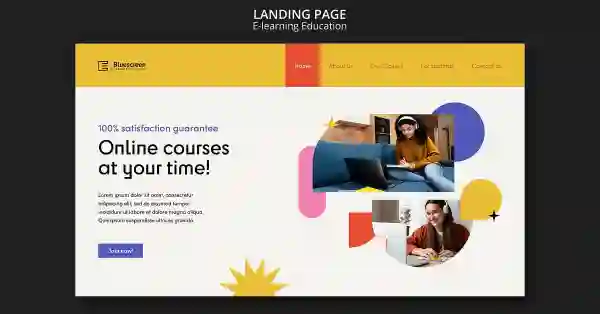
Explore the best free templates for online courses to simplify course creation. From course structure to engaging designs, these templates will help you deliver a professional and interactive learning experience without the need for technical expertise or
Creating a successful online course involves more than just providing good content. To keep students engaged and ensure they have a seamless learning experience, course structure and design matter just as much. Templates help solve these challenges in multiple ways:
Time-Saving Design Solutions
Building a course from scratch can take a lot of time, especially when it comes to designing layouts, picking colors, and formatting content. Free templates can save you hours of work by providing pre-designed structures that you can customize to fit your needs.
Professional Appearance
Templates are crafted by experienced designers, which means they already have a polished, professional look. By using these templates, you can give your course a high-quality design without the need for advanced skills in graphic design or user experience.
Consistency Across Modules
When creating an online course, consistency is essential. Templates help maintain a uniform look and feel throughout all the modules, making it easier for students to navigate and interact with the content. This consistency improves the overall learning experience.
Customization Flexibility
While templates provide a solid foundation, they also allow for customization. Whether you're offering a business, art, or technology course, you can tweak the design, colors, and layout to reflect your personal style or branding.
Types of Free Templates for Online Courses
There are various types of free templates available to suit different types of courses and learning management systems (LMS). Below are the most common types and what each template can offer:
Course Structure Templates
These templates focus on how you organize the content of your course. They include predefined sections such as introduction, objectives, lessons, quizzes, assignments, and final exam modules. A well-organized structure ensures that students can follow along easily, track their progress, and access learning materials with little to no confusion.
Interactive Content Templates
Online courses benefit from interactive content that keeps students engaged. Templates for interactive elements include quizzes, polls, assignments, and discussion forums. These templates make it easy to embed these elements into your course and keep students motivated.
Landing Page Templates
The landing page is the first impression your course will make on potential students. Free landing page templates are pre-designed to highlight your course’s key features, course outcomes, pricing information, and testimonials. These templates are optimized for conversions, meaning they are designed to convert visitors into students.
Presentation Templates
If you plan on delivering video-based content or hosting live sessions, presentation templates can be invaluable. These templates are designed to help you create visually appealing slides that communicate your ideas effectively while keeping students engaged. They often include space for images, bullet points, videos, and even animations.
Learning Management System (LMS) Templates
If you are using an LMS like Moodle, Teachable, or Thinkific, you can find free templates designed specifically for these platforms. These templates will integrate seamlessly with the LMS, offering features like course completion tracking, student registration, and easy content delivery.
Certificate Templates
Upon completion of a course, it’s common practice to offer students a certificate. Free certificate templates allow you to create professional-looking certificates to reward your students' achievements. These templates can often be customized with your logo, course name, and completion date.
Best Websites for Free Online Course Templates
There are numerous platforms offering free templates that can make the course creation process more efficient. Below are some of the top websites to explore:
Canva
Canva is a well-known design tool that offers a variety of free templates for online courses. Whether you need a landing page, course presentation, or certificate design, Canva provides easy-to-use templates that you can customize to match your branding. The drag-and-drop functionality makes it simple for even beginners to create professional designs.
Google Slides
For instructors who prefer creating course presentations, Google Slides offers several free templates specifically designed for educational content. You can easily add images, animations, and other media to your slides. The best part is that Google Slides integrates with Google Classroom, making it an ideal choice for educators using the platform.
Moodle Templates
If you’re using Moodle as your LMS, Moodle’s template repository offers a collection of free templates designed for course structure, grading, and student interaction. These templates are customizable and can be easily integrated into your Moodle course, allowing for efficient content delivery.
Teachable Templates
Teachable offers a limited set of free course templates that allow you to build a streamlined course with minimal effort. These templates are designed to work within the Teachable platform and help you create a user-friendly course site. You can easily customize them with your content and branding.
Wix
Wix offers free online course templates for instructors looking to create their own course websites. These templates are mobile-responsive and customizable, which means your course will look great on any device. Wix also has an intuitive drag-and-drop builder that makes it easy to create a professional site without coding knowledge.
Thinkific
Thinkific provides free templates to help you build your online courses quickly and effectively. Thinkific templates are designed with educators in mind, focusing on simplicity and ease of use. From course structures to sales pages, Thinkific gives you the tools to create a functional and attractive online course.
How to Choose the Best Template for Your Course
While many free templates are available, it's essential to choose one that aligns with the unique needs of your course. Here are some factors to consider:
Course Content
Make sure the template suits the type of course you're offering. If your course involves multimedia, choose a template that supports video and audio integration. For text-heavy courses, go for a template that highlights readability.
Customization Options
Look for templates that allow for easy customization. You’ll want to adapt the template to fit your branding, such as colors, logos, and course content layout.
Ease of Use
Choose a template that is easy to use and doesn’t require advanced technical skills. Platforms like Canva and Google Slides are user-friendly and perfect for beginners.
Mobile-Friendliness
Given that many students will access your course from mobile devices, ensure your template is responsive and looks great on all screen sizes.